Inquiry
Form loading...

10 Best Projector Racks for Home and Office

A well-chosen Projector Rack can make a home theater feel calmer and an office presentation easier to manage. It keeps the projector steady, protects cables from becoming a floor-level obstacle, and helps place the lens at a useful height. Small details matter: a shelf that wobbles during a meeting, a blocked ventilation grille, or a cable stretched across a walkway can undermine an otherwise good setup. The right rack should fit the room, projector, and people using it.

For a transparent editorial perspective, fictional AV specialist Maya Chen puts it this way: “A good projector rack supports the image by getting the basics right: stable placement, clear airflow, and tidy connections.” That is a practical rule, not a verified quotation from a real industry professional. In the selections ahead, we compare racks by stability, adjustability, materials, cable management, and suitability for different spaces. Some options may look polished but offer limited flexibility; others may be sturdy yet awkward to position. Check dimensions and load ratings against your projector before buying. A rack cannot fix every installation problem. But it can make the setup safer, cleaner, and easier to use.
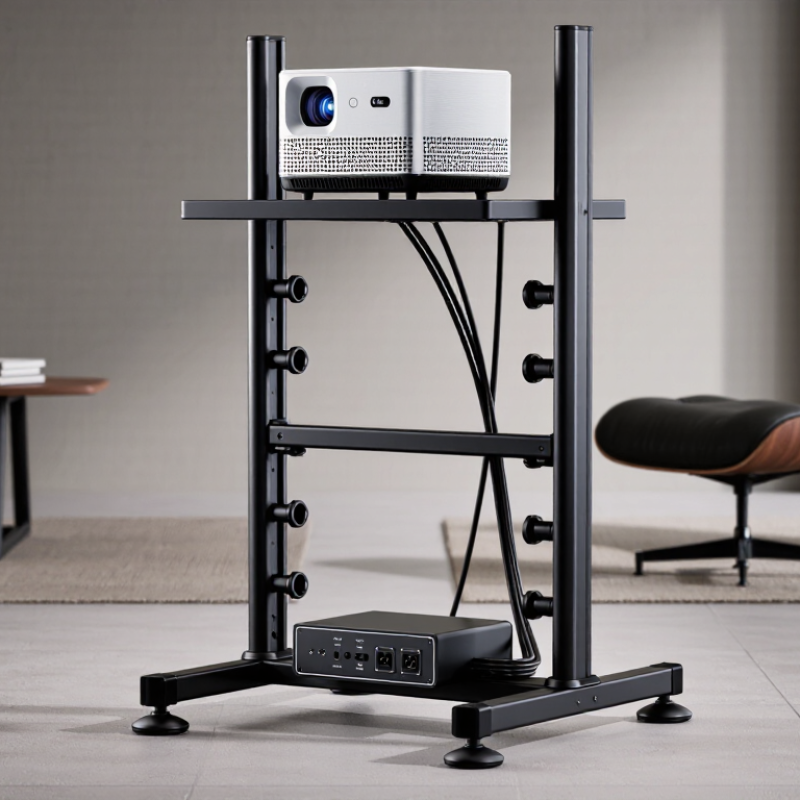
10 Best Projector Racks for Home and Office

What Projector Racks Are and How They Support AV Setups

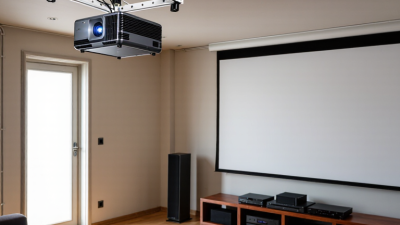
Projector racks are support structures that hold a projector at a stable, useful position within a home or office AV setup. They may sit on a shelf, attach to a wall, or hang from a ceiling, depending on the room layout and equipment. A good rack keeps the image aligned while leaving space for power and signal cables. Stability matters. Even slight movement can shift the picture away from the screen. Check the projector’s weight, mounting pattern, and ventilation needs before choosing a rack; blocked vents can cause heat buildup.

In a meeting room, a ceiling rack can keep the projector above passing traffic and reduce clutter on tables. At home, a shelf rack may be easier to reach when adjusting focus or connecting a streaming device. Look for secure fasteners, enough clearance around the unit, and a practical path for cables. Measure the throw distance and screen position before installation, rather than correcting a crooked image afterward. Small details matter. Cable slack is easy to overlook, and a setup can look neat while still pulling on a connector. That may not become obvious until something shifts. A careful fit supports reliable operation, though the best rack depends on the room and projector.

Key Factors for Choosing a Home or Office Projector Rack

Choosing a projector rack starts with the room, not its finish. Measure the projector’s footprint, lens position, cable space, and distance to the screen. A shelf may fit the unit yet block an exhaust vent or pinch a signal cable. Keep the clearance specified for the projector, and check airflow while it is running. Warm air can collect inside enclosed cabinets. For elevated shelves, check that the beam clears doors, people, and ceiling fixtures.

Load capacity deserves careful reading. NIOSH’s 1994 Applications Manual for the Revised NIOSH Lifting Equation uses a 51-pound load constant only under ideal lifting conditions; reaching or twisting reduces recommended limits. This is a lifting guideline, not a rack rating. Still, it is a useful reminder to plan installation carefully. Choose a rack with documented capacity, and include the projector, lens, and any media equipment in your estimate. Locking casters can help in shared rooms, but may wobble on uneven floors. Fixed racks feel steadier, though access can be harder. Check ventilation, filter access, and whether controls remain reachable without shifting the projector. Small details matter.

10 Best Projector Racks for Home and Office: Key Selection Factors

Practical buyer-priority ratings for comparing projector racks. Scores are editorial guidance on a 1–5 scale, not survey results or product measurements.

Prioritize a rack’s load rating and platform compatibility first; then consider adjustability, cable management, stability, and installation needs. Always verify the rack’s stated capacity and dimensions against your projector.

The 10 Best Projector Racks for Different Rooms and Needs

The best projector rack depends on the room, the screen position, and how often the equipment moves. A ceiling shelf suits a dedicated media room, while a low-profile wall shelf works well in a small bedroom. For shared offices, a rolling cart keeps the projector portable between meeting spaces. Locking wheels help, but they do not replace careful cable management.

Different setups call for different support. A tripod stand is useful for temporary presentations; a tall AV stand can hold a projector and a laptop together. Compact tabletop stands suit desks, while adjustable pole mounts help align a projector with a high screen. A clamp-on rack can save floor space on a sturdy desk. Check the clamp’s weight rating before trusting it.

Corner shelves can make awkward rooms more usable, and ventilated cabinets help keep equipment tidy without trapping heat. Fit matters more than appearance. Measure the projector’s footprint, note the lens direction, and leave room for airflow and cables.

In a bright office, a stable rack with a fixed position may reduce repeated adjustments. In a living room, a discreet shelf can blend in, though it may limit access to ports. It is easy to overlook that detail.

Compare height range, load capacity, mounting hardware, and access to controls before choosing; a rack that looks right can still put the image out of alignment.

How to Install and Position a Projector Rack Safely

Choose a rack rated for the combined weight of the projector, shelf, and accessories. Check the rack instructions before drilling. For a ceiling installation, fasten it into a joist or suitable masonry, using hardware designed for that surface. Drywall alone is not a secure anchor. Measure twice. If you cannot confirm the support behind the ceiling, ask a qualified installer rather than guessing.

Position the rack so the projector has clear airflow and its lens matches the screen’s height and distance requirements. Leave room to reach focus controls and connections. Keep cables away from hot vents and walking paths, and secure any loose slack so it cannot snag. A centered image can look ideal, yet the rack may be frustrating to service later. Access matters, too.

Use a stable ladder and have someone steady it or assist with lifting. Tighten fasteners evenly, then gently check the rack for movement before placing the projector on it. Once mounted, confirm the image alignment and make small adjustments before fully securing the final position. Measurements are not always perfect; a few millimeters can shift the picture. If the rack tilts, flexes, or feels loose, take the projector down and inspect the mounting rather than trying to compensate with extra force.

Comparing Rack Features, Compatibility, and Value

Projector racks differ less by appearance than by fit, stability, and access. A ceiling shelf saves floor space, while a mobile cart suits shared rooms and changing layouts. Check the projector’s mounting pattern, weight, lens position, and throw distance before comparing prices. A rack can support the stated load yet still place the image too high or block a vent. Measure twice. That small step can prevent a costly return.

AVIXA’s 2024 Industry Outlook and Trends Analysis projects professional audiovisual revenue to reach $325 billion by 2028. The forecast reflects growing demand for integrated AV systems, though it does not measure projector-rack sales specifically. For buyers, compatibility remains the practical test: look for clear load ratings, adjustable shelves, secure cable routing, and enough open space around vents. A steel frame may feel reassuring, but poor adjustment can make alignment frustrating. I find product specifications oddly optimistic about “universal” fit. Confirm dimensions against your projector and room, not just the listing.

Value also includes installation effort and future changes. A rolling rack with locking casters may cost more, but it can serve several rooms. A fixed rack may be simpler where the screen position never changes. Compare total cost, including required mounting hardware and cable extensions. Check the return policy, too; even careful measurements can miss a lens offset or an awkward ceiling beam.

10 Best Projector Racks for Home and Office - Comparing Rack Features, Compatibility, and Value

This comparison covers common projector-support styles rather than specific products. Check each projector’s mounting pattern, weight, ventilation needs, and the support’s published load rating before installation.

Rank Rack or Support Type Key Features Compatibility Checks Main Trade-Off Relative Value
1 Adjustable ceiling mount with extension pole Suspends the projector from the ceiling; an adjustable pole helps set the drop and positioning. Confirm the mount matches the projector’s mounting points and that the ceiling structure and fasteners are suitable for the total load. Installation usually requires careful alignment and secure attachment to structural support. High for permanent rooms where a clear floor and consistent placement matter.
2 Low-profile ceiling mount Keeps the projector close to the ceiling for a tidy, unobtrusive installation. Check projector mounting-hole spacing, access to connections, lens position, and clearance for ventilation. Offers less flexibility for adjusting height than a mount with an extension pole. High when the ceiling height and projector position already suit the room.
3 Universal ceiling bracket Adjustable arms can accommodate a range of projector mounting patterns. Verify that the arms reach the projector’s threaded mounting points and that the bracket’s rated capacity is adequate. Fit is not universal; some projectors need a model-specific adapter or cannot use the bracket. Good for mixed-device environments when the mounting pattern is confirmed first.
4 Wall-mounted projector shelf Provides a flat platform without requiring a projector-specific mounting interface. Check shelf depth and width against the projector’s footprint; leave room for ports, cables, and airflow. The shelf and wall fixings must safely support the load, and the projector may be more exposed to bumps. Good for smaller rooms where a nearby wall provides a suitable projection position.
5 Adjustable wall arm Extends from the wall and can provide more positioning flexibility than a fixed shelf. Confirm arm reach, movement range, wall construction, and the support’s load rating; extended arms increase leverage on the wall fixings. Requires especially careful attention to secure wall attachment and projector stability. Moderate to high when the projector must sit away from the wall.
6 Floor-standing projector pedestal Places the projector on a freestanding platform and avoids permanent ceiling or wall installation. Check platform size, height adjustment, base stability, and the rated capacity of the complete stand. Uses floor space and may be vulnerable to accidental movement in busy areas. Good for renters and rooms where drilling is not practical.
7 Projector AV cart Combines a projector platform with mobility; some designs include additional shelves for presentation equipment. Check platform dimensions, total cart capacity, wheel locks, and clearance through doorways and aisles. Larger and less visually discreet than a fixed mount; lock wheels during use. High for classrooms and meeting spaces that share equipment between rooms.
8 19-inch equipment-rack shelf Fits compatible 19-inch equipment racks and can keep projection equipment with other AV components. Confirm rack-rail compatibility, shelf depth, usable surface area, ventilation, and the shelf’s load rating. Requires an equipment rack and may not place the projector at the right height or angle by itself. High when a compatible rack is already part of the AV setup.
9 Tripod projector stand with platform Portable and height-adjustable; a platform supports projectors that do not attach directly to a tripod head. Check platform dimensions, stand capacity, leg spread, and stability at the intended height. A lightweight stand can wobble or tip if overloaded, extended too high, or placed on an uneven surface. Good for occasional presentations and temporary setups.
10 Desktop or table-top projector platform A compact platform helps position a projector on an existing desk, table, or cabinet. Confirm that the surface is level and stable and that the projector has adequate clearance for cooling and cable connections. Uses existing furniture and may be disturbed if the surface is shared or frequently moved. Very good for low-cost, temporary, or small-room installations.

Safety note: Published load limits, approved fasteners, structural attachment, and the projector manufacturer’s installation guidance take priority over general comparisons.